
Mobile applications

Mobile applications designed for the uses that truly matter.

Nuevamed designs custom mobile applications for organizations that need to make a service, action, or information more accessible on the move while connecting the experience to existing data and systems.

01Product strategy02Mobile UX03iOS & Android04APIs & integrations05Access & data06Quality & publishing07Continuous evolution

When mobile becomes useful

An application is not just another format. It is direct access to an important use.

Mobile becomes relevant when users need to act frequently, quickly, or while on the move, access personal information, receive useful reminders, or continue a journey that cannot wait until they return to a computer.

Provide access to a service when it is needed

A customer, member, citizen, partner, or employee needs to view information, submit a request, track a status, or access a service while mobile.

We design concise, accessible journeys connected to the information that is genuinely useful.
Support field teams and operations

Teams need to view data, complete tasks, report a situation, or coordinate an action without relying on scattered tools or manual processes.

We structure a mobile experience adapted to roles, actions, and real working conditions.

Simplify a recurring customer or member journey

When a user regularly returns to book, track, request, view, or communicate, mobile can reduce friction and make the service easier to access.

We connect journeys, access, data, and notifications into one coherent experience.

Extend an existing platform without unnecessary duplication

A website, portal, or product already exists, but some uses require a faster, more contextual experience closer to users’ daily routines.

We assess the right role for mobile before defining what should be reused, adapted, or built.

Scope of work

Applications defined by the service they provide, not by a preset model.

A mobile application can become a service access point, an operational continuity tool, or a personalized experience. Its form depends on the users, data, teams, and systems it needs to connect.

03

Mobile portals and secure services

Create reliable access to data and services based on each user’s rights.

Authentication · access · permissions · APIs · traceability
04

Booking, request, and tracking applications

Structure journeys where users need to request, schedule, book, track, or receive an update.

Forms · statuses · notifications · services · integrations
05

Mobile extensions of a product or platform

Extend an existing product by prioritizing frequent, contextual, or time-sensitive uses.

Synchronization · experience · data · journeys · evolution
06

Applications with targeted intelligent capabilities

Add assistance, classification, search, or automation only when these functions address a clearly defined need.

Data · human validation · applied AI · governance · usefulness

Common situations

When the mobile experience needs to connect more than screens.

These scenarios illustrate possible project contexts. They are neither client projects nor guaranteed outcomes.

01

A mobile service that supports users at the right moment.

Context

An organization already provides services or information online, but users need more immediate, personalized access adapted to a mobile situation.

Possible contribution
  • Mobile journeys
  • Accounts and access
  • Useful notifications
  • Contextual services
  • API integrations
Intended valueMake the service easier to access when users need it without multiplying channels or steps.
02

A mobile tool that makes field operations more visible.

Context

Field teams use several tools, notes, emails, or calls to complete tasks, report situations, or access the information they need.

Possible contribution
  • Roles and permissions
  • Structured data entry
  • Connected data
  • Statuses and alerts
  • Synchronization
Intended valueReduce fragmentation, support field actions, and connect information to the right systems and teams.
03

A mobile extension for a platform that needs to serve users better.

Context

A web platform already addresses part of the need, but its most frequent uses require faster, more personalized interactions adapted to mobile devices.

Possible contribution
  • Usage audit
  • Mobile prioritization
  • UX and design system
  • APIs and data
  • Evolution plan
Intended valueDefine a clear role for mobile and avoid unnecessarily reproducing the entire web platform in an application.

Are you assessing the role of mobile in your service journey?

Discuss your context
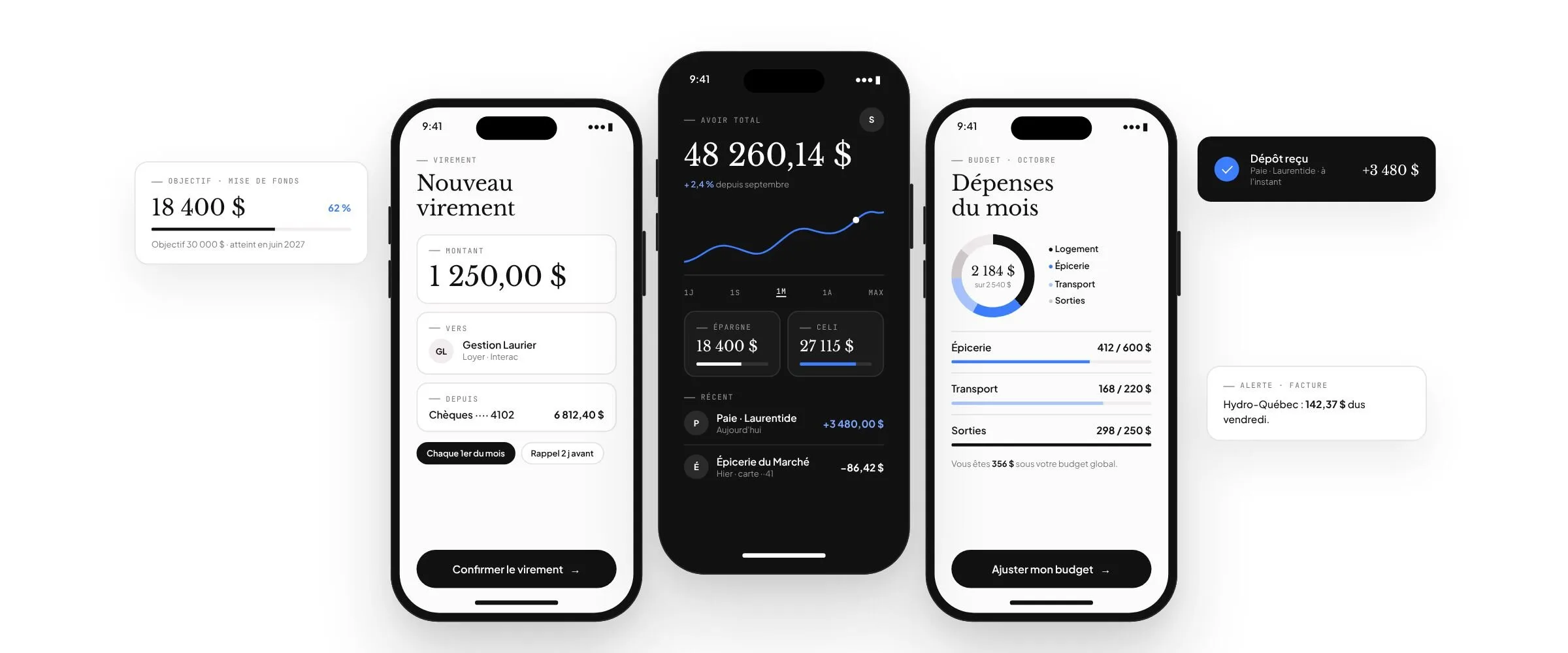
Three screens from a personal finance mobile app: a $1,250 transfer, a total balance of $48,260.14 with its trend, and monthly spending tracked by category, surrounded by deposit and bill notifications.

Mobile architecture and integrations

A useful mobile application integrates with your ecosystem rather than operating beside it.

The application is an experience layer. Its value depends on how it accesses data, respects roles, exchanges information with existing services, and remains manageable for the teams that evolve it.

Roles · Accessibility · Context · Notifications · Continuity

Users and devices

Journeys adapted to real roles, situations, and devices.

Define the right mobile approach

Suitable when

You need to provide a consistent experience on iOS and Android while centralizing much of the product’s evolution.

Provides

A shared foundation, coordinated development, and an experience adapted to both platforms.

Consider

The choice depends on mobile features, expected performance, integrations, and platform-specific usage.

Case studies

Applications designed for the field.

A few examples of applications built around real usage, business constraints, and existing systems.

01

Telehealth platform

Telehealth connected to the clinical record, movement analysis, and return to play.

An application for physicians, physiotherapists, strength coaches, and athletes: real-time video consultation, clinical notes, protocols, and injury tracking in a single record.

  • Next.js and TypeScript
  • WebRTC video consultation
  • NestJS API and PostgreSQL
  • HL7 FHIR interoperability
02

Mobile rental marketplace

Peer-to-peer rentals, from first contact to the final review.

A transactional app where people discover, book, exchange, rent, and review an item available nearby, paired with a back office that manages listings, bookings, commissions, and disputes.

  • Hybrid iOS and Android app
  • Peer-to-peer listings
  • Bookings, payments, and commissions
  • Administration back office
03

Payment collection app for merchants

A payment link created in seconds, collected and paid out without manual tracking.

A mobile app that generates payment links with amount, description, optional customer, due date, and QR code, tracks every collection by status — paid, pending, expired, refunded — and shows the next payout, transfer history, and fees before the link is even created.

  • React Native and Expo in TypeScript
  • Laravel API and PostgreSQL
  • Stripe Connect for payments and payouts
  • Fees shown before every link

Test-mode screenshots: merchants and amounts are fictitious.

04

Medication search engine concept for clinicians

A clinical question linked to verifiable passages from medical sources.

Terrain connects a question and the clinical context entered to relevant passages from verifiable medical sources. It helps find information without replacing professional judgment or recommending a treatment.

  • Clinician and admin interface: TypeScript, React and Next.js
  • API and business logic: TypeScript
  • Document processing and search: Python
  • Data, versions and traceability: PostgreSQL
  • Optional AI assistance: API integration after health data scoping

UX concept: fictional documents, patients and data.

Nuevamed method

From the first use to an application ready to evolve.

A successful mobile application is built around precise decisions: priority uses, journeys, data, integrations, quality, and how the application will continue to evolve after launch.

  1. 01
    Step 1

    Understand priority uses

    Identify users, mobility contexts, frequent actions, constraints, and the moments when the application must create value.

    Step outcomePriority uses and initial scope.
  2. 02
    Step 2

    Frame the mobile path

    Define the role of mobile, dependencies, data, systems, risks, and decision criteria.

    Step outcomeRoadmap and initial architecture.
  3. 03
    Step 3

    Design journeys and interfaces

    Create concise journeys, testable interfaces, and a visual language aligned with the uses and target devices.

    Step outcomeValidated experience and core components.
  4. 04
    Step 4

    Develop and integrate

    Build the interfaces, services, data, access, and connections required with a structured, testable approach.

    Step outcomeFunctional, integrated release.
  5. 05
    Step 5

    Test and prepare publishing

    Verify journeys, behaviour, performance, access, and launch requirements.

    Step outcomeRelease prepared for deployment in its context.
  6. 06
    Step 6

    Measure and evolve

    Observe usage, gather feedback, correct friction, and evolve the application alongside the service.

    Step outcomeContinuous improvement path.

Engagement models

A framework adapted to the maturity of your mobile project.

The right collaboration model depends on the maturity of the need, the teams already involved, and your organization’s capacity to evolve the product over time.

01

Custom project

A defined scope, structured delivery, and agreed deliverables for a product or major evolution.

Suitable whenThe need must be framed and delivered in a structured way.
02

Dedicated team

Reserved product and technical capacity to advance a mobile roadmap and continuous improvements.

Suitable whenPriorities evolve and require ongoing collaboration.
03

Fixed package

A defined scope, budget, and schedule for a precise, limited, well-framed need.

Suitable whenThe expected outcome, limits, and dependencies are known.
Schedule an initial conversation

Do you need to define the right role for mobile before starting the project?

Frequently asked questions

Clarify the decisions before launching a mobile application.

The right starting point depends on users, uses, the existing ecosystem, and the level of service the application genuinely needs to provide.

01How do we know whether a mobile application is relevant for our organization?

We assess usage frequency, mobility context, expected actions, notification needs, data, and the systems involved. An application is recommended only when it provides value distinct from the web.

02Can you design an application for iOS and Android?

Yes. The approach is selected according to uses, device capabilities, expected performance, integrations, and the maintenance path rather than a technology preference.

03Can you extend an existing website, portal, or platform to mobile?

Yes. We identify what can be reused, what must be adapted for mobile uses, and what should not be duplicated in the application.

04Can you connect the application to our CRM, ERP, APIs, or internal systems?

Yes, after reviewing the available interfaces, sources of truth, rights, data quality, and responsibilities across systems.

05How do you design an application for several roles, customers, members, or employees?

We clarify roles, actions, permissions, accessible data, and exceptions before structuring the appropriate journeys and controls.

06How do you handle access, data, and sensitive journeys?

These requirements are defined with the relevant stakeholders according to the organization’s data, risks, policies, and systems, then verified during design and delivery.

07Can you support publishing and updates?

Yes, by preparing releases, required materials, tests, and submission follow-up. Acceptance and timelines remain under the distribution platforms’ responsibility.

08Can you evolve or take over an existing application?

Yes, when access to the code, accounts, environments, and dependencies allows for a serious assessment. We begin by clarifying the current state and a realistic path forward.

Your mobile project

Your application should be useful before it is downloaded.

Tell us about the users, services, operations, and systems your application needs to connect. We will help clarify the priority uses and the right approach before selecting a solution.

  • Priority use to clarify
  • Architecture selected for the context
  • Collaboration with your internal teams

Describe your need

Fields marked with an asterisk are required.

Privacy and request processing — The information entered is used only to prepare and respond to this inquiry, subject to applicable rules.