Development
Migrating your CMS without losing your rankings: what to protect, in order
A CMS migration is often treated as a design project: a new site, a new platform, a launch. For an established site, it is first a preservation exercise. Rankings, backlinks, analytics history and legacy URLs live on infrastructure that is about to be switched off. Every signal is either carried over deliberately or lost by accident.


Recommendation: name an owner for each stage, require written verification at every step, and reject any redirect that hasn't been tested.
We migrated our own WordPress articles to a modern React server-side-rendered application; WordPress remains in use for forms. An archived production audit recorded 162 URLs including filter variants, 72 French/English pairs and 6,360 internal-link rows, not necessarily distinct links. Our web and software development team works through the same preservation questions when planning migrations.
What a migration has to protect
A migration must protect more than the pages in the current CMS. The full set of live URLs includes forgotten pages, while existing server and CDN redirects may preserve paths that no longer appear in the navigation.
- Live URLs and existing server or CDN redirects, including older paths and forgotten pages.
- Titles, descriptions, headings and canonical tags.
- Structured data, internal links and pagination.
- Media URLs and alternative text.
- Indexing directives, analytics history and measurement.
In a headless architecture, responsibility for page rendering, preview and sitemap generation shifts to the application. Those responsibilities need explicit owners and tests rather than an assumption that the old CMS will continue to provide them.
Step 1. Inventory before anyone touches the new build
Cross-check several sources before deciding what must move. No single export or crawl is a complete inventory.
- A full production crawl with Screaming Frog or an equivalent crawler.
- All XML sitemaps, including image and video sitemaps.
- Recent server logs, to find URLs that receive requests even if they are not linked in the current site.
- Analytics landing pages, to identify URLs that receive sessions and conversions.
- Search Console pages and queries, to identify URLs with search impressions and clicks.
A CMS export misses off-template campaigns, linked PDFs and earlier URLs. For our own migration, we added a WordPress database export that revealed content and tags missing from the crawl. Reconcile the sources and investigate discrepancies instead of treating one as authoritative.
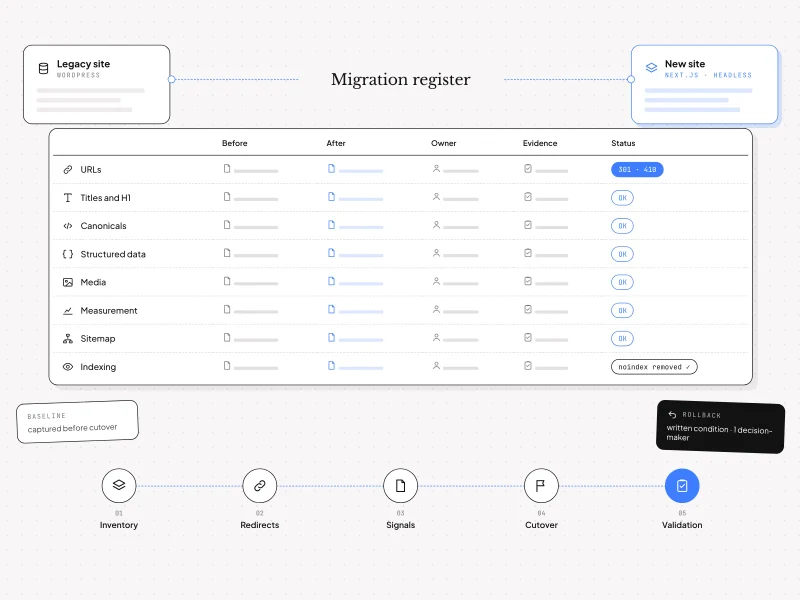
Capture the baseline while the old site is live
Record impressions, clicks, sessions and conversions per URL, as well as template titles and descriptions and existing redirect rules. Stacked redirects can create chains when a new rule is added on top of an old one. Store the inventory and baseline in a shared, dated location so the team can compare the same evidence after launch.
Step 2. Build and test the redirect map
Create one row per URL with the source, destination, status, decision, owner and test. Google's site-move guidance recommends permanent server-side 301 or 308 redirects, avoiding chains and keeping redirects in place for at least one year. Include the map and its tested rules in the handover documentation.
| Code | Meaning | Use |
|---|---|---|
| 301 | Permanent redirect | Move an old URL to a genuine equivalent. |
| 308 | Permanent redirect, method preserved | Use when the request method must be preserved, for example for POST. |
| 302 / 307 | Temporary redirect | Use for a temporary move; avoid for a permanent migration because the old URL remains the reference. |
| 404 | Not found | A removed or missing page with no specific retirement decision. |
| 410 | Permanently gone | A deliberate retirement when no equivalent exists. |
Never invent a redirect just to avoid a missing page. Sending many unrelated URLs to the homepage can be treated as a soft 404. In our migration, dated articles and tag archives were deliberately retired with 410; the Magento page moved to an Adobe Commerce equivalent with 301. These are decisions for those URLs, not blanket rules for every article, archive or platform page.
Test the map on staging across representative templates and languages and the twenty most visited URLs. Check trailing slashes, rule order against language routing, the actual HTTP status and the destination, not just the address displayed in the browser.
Step 3. Rebuild with signal parity
Check by template: one faulty template can affect hundreds of pages. In a headless build, first confirm that important signals are present in server-rendered or static HTML rather than injected only on the client. Compare old and new pages for titles, descriptions, heading order, canonicals, pagination, hreflang, image filenames and alt text, and internal links.
Warning: replacing existing titles with a brand message can remove a strategic phrase from the <title> and H1 and potentially affect rankings. That is an editorial decision, not a neutral technical change; make it deliberately and record it.
For a framework to govern these trade-offs beyond the migration, see our eight decisions to protect your visibility in Google and AI search.
Canonicals, parameters and media
For duplicate URLs, Google describes redirects and canonical annotations as strong signals and sitemap inclusion as a weaker signal. Use absolute, self-referencing canonicals where appropriate, and examine filter, sort and tracking parameters rather than assuming every variation should be indexed.
Legacy media URLs can remain intact when files are served from stored copies, or they can be rewritten deliberately. Do not assume every legacy file is available: inventory and verify the files and URLs that pages actually use, including their alt text.
Step 4. Inventory structured data by template
List Organization, Article, FAQPage, Product and BreadcrumbList markup by template, then compare the types and properties generated on the new site. Google's structured data policies require structured data to represent visible content accurately; required properties also matter for eligibility. Eligibility does not guarantee a rich result.
When structured data is generated in application code, assign responsibility for its implementation and testing. Verify representative pages against the visible content and applicable Google requirements before and after launch.
Step 5. Keep staging out of Google
Decide separately who can access staging and whether search engines may index it. Access control protects a private environment; a noindex meta tag or HTTP header addresses indexing. Google's noindex guidance explains that robots.txt is not a substitute for noindex: a robots disallow rule can prevent a crawler from seeing the noindex directive.
Name an owner for removing development indexing directives in production, and make that removal a numbered, verified launch step. Check production robots.txt does not block old URLs that need to be crawled for redirects or 410 responses, and include the sitemap pointer.
Step 6. Run a controlled cutover
Use a timed runbook with an owner and verification for each action. Announce the window and prepare rollback conditions before anyone starts.
- Freeze content and announce the migration window.
- Run the final content sync and compare counts.
- Lower the DNS TTL ahead of the window if DNS changes are planned.
- Remove development indexing directives and verify the production response.
- Activate the redirect map and test representative templates and languages.
- Publish the new sitemap and retire the old one.
- Purge CDN and page caches, then verify responses from outside the internal network.
- Confirm analytics and tags fire, and monitor logs and HTTP statuses.
Prepare explicit rollback conditions and designate one person authorized to make the decision. DNS can be switched back; an overwritten database or other changes made after cutover may not be reversible in the same way. Test recovery rather than assuming that reversing routing restores everything.
Verify the relevant Search Console properties and variants. The Change of Address tool is for a domain change, not a same-domain platform migration.
Step 7. Preserve measurement
Keep the existing analytics property and its history where possible. Verify event names, conversions, Google Tag Manager, consent behaviour and URL dimensions, including the applicable Quebec Law 25 requirements. Annotate the cutover date in GA4 and rebuild leadership reports against the new URLs and verified conversions. Measurement needs an owner, not just a tag that appears in the source code.
Step 8. Prove the migration held
Recrawl every legacy URL and verify its expected status and destination. Redirected URLs should reach their intended destination in one hop; deliberately removed URLs marked 410 should remain 410. Give every exception an owner and due date.
- Redirect loops and chains, including rules inherited from the old server or CDN.
- Soft 404s, including an unrelated page returned with HTTP 200.
- Ignored canonicals and unexpected indexed URL variants.
- Old sitemap URLs that were lost without a documented decision.
Compare the same URL samples and measurements against the dated baseline. Give search engines time to recrawl and process the changes; a launch-day check alone cannot prove the longer-term outcome.
Checklist at a glance
| Step | Deliverable | Owner | Warning sign |
|---|---|---|---|
| Inventory | Cross-checked URL list and dated baseline | SEO | Only a CMS export |
| Redirects | Row-by-row map, tested | SEO / development | Everything goes to the homepage |
| Signals | Template comparison | Development | A key phrase disappears |
| Structured data | Types checked per template | Development | No owner |
| Staging | Rules to remove at launch | Operations | Noindex on production |
| Cutover | Timed runbook and rollback | Project lead | No rollback condition |
| Measurement | Property kept and date annotated | Analytics | Conversions not verified |
| Validation | Recrawl of legacy URLs | SEO | No baseline |
Frequently asked questions
How long should redirects be kept?
Google recommends at least one year. Ideally, keep redirects permanently for pages receiving external links: maintaining them is inexpensive compared with the value that can be lost when those links stop working.
Should every old page be redirected?
No. Redirect to a genuine equivalent, not an unrelated page or the homepage by default. An intentionally retired page with no equivalent can return 410.
Does a migration always cause a traffic drop?
No. Temporary fluctuations are common while search engines recrawl a site. A lasting drop can indicate a missing redirect, a lost signal or a removed page, and should be investigated against the baseline.
Should content and design migrate at the same time?
They can, but changing content and design alongside the platform complicates diagnosis if traffic changes. Assign a search intent to each page before major rewriting and document deliberate changes.
Who owns SEO during a migration?
Name a person responsible for SEO with the authority to block launch if the agreed checks fail. Development, operations, analytics and the project lead still own their respective verification steps.
Preserve first, then validate
Start with the inventory, then protect redirects and page signals, keep staging out of search, run a scripted cutover and validate against the baseline. There is no guarantee of stable rankings, but a documented migration makes it possible to identify the cause of a loss and fix it quickly.
Nuevamed supports WordPress, Magento and Drupal migrations to headless architectures with a tested redirect map and post-launch validation. Explore our SEO and AI search strategy to discuss what your site needs to preserve.
Google sources
| Source | Use in this checklist |
|---|---|
| Site move with URL changes | Permanent redirects, redirect retention and site-move verification. |
| Consolidate duplicate URLs | Canonicalization signals and duplicate URL handling. |
| Structured data general guidelines | Visible content, structured data policies and eligibility. |
| Block indexing with noindex | Noindex directives and the limitations of robots.txt. |
Facing a similar challenge in your organization?
Discuss your project